

Corridors Page
Corridors
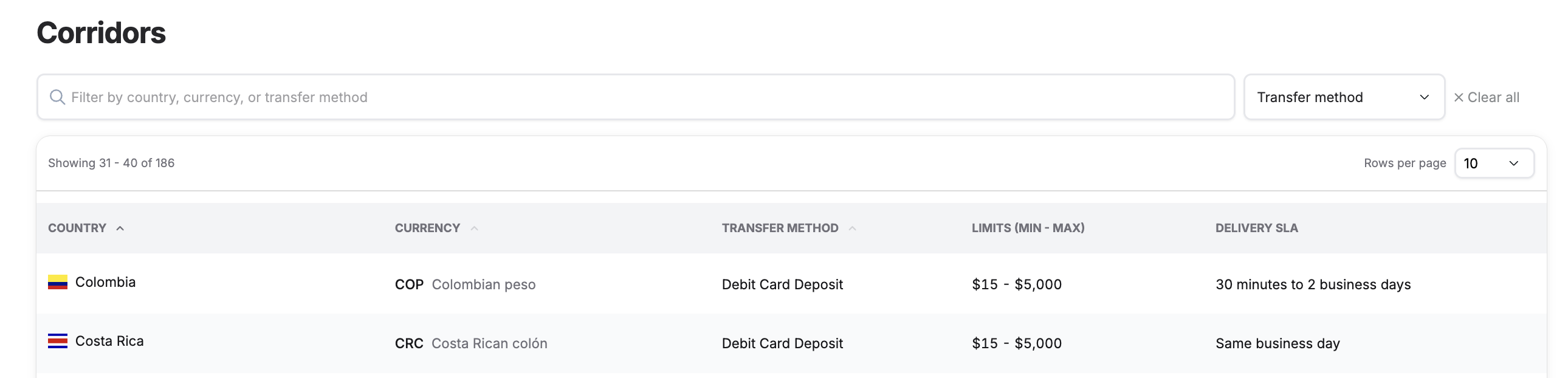
The Corridors page in the Admin Portal gives you a consolidated, searchable view of every payout corridor available to your program. Use it to confirm which destination countries, currencies, and transfer methods are supported, along with their transaction limits and expected delivery times.
Note: The Corridors page is read-only. It is a reference view for confirming corridor availability and details. Changes to your enabled corridors are managed by your PayMitto implementation contact — they cannot be edited from this page.
What you'll see
Each row represents a single corridor and includes the following columns:
| Column | Description |
|---|---|
| Country | The destination country for the payout, shown with its flag and name. |
| Currency | The payout currency, listed by its ISO 4217 code (e.g., COP) and full name (e.g., Colombian peso). |
| Transfer Method | How funds are delivered for that corridor (e.g., Debit Card Deposit). |
| Limits (Min – Max) | The minimum and maximum transaction amounts permitted for the corridor (shown in USD). |
| Delivery SLA | The expected delivery window for a completed transfer, from fastest to slowest (can vary by country and transfer method. It is an estimate, not a guarantee.). |
Finding a corridor
- Search: Use the filter bar to search by country, currency, or transfer method. Results update as you type.
- Filter by transfer method: Use the Transfer method dropdown to narrow the list to a specific delivery type.
- Clear filters: Select Clear all to reset the search and filters and return to the full list.
- Page through the results to browse the full set of available corridors.
If a corridor you expect to see is missing, or you'd like to add or change corridor availability, contact your PayMitto implementation contact.
Updated about 1 month ago